---
sidebar_position: 1
sidebar_label: Overview
title: Configuration Overview - Getting Started with Promptfoo
description: Complete guide to configuring promptfoo for LLM evaluation. Learn prompts, providers, test cases, assertions, and advanced features with examples.
keywords:
[
promptfoo configuration,
LLM evaluation setup,
prompt testing,
AI model comparison,
evaluation framework,
getting started,
]
pagination_next: configuration/reference
---
# Configuration
The YAML configuration format runs each prompt through a series of example inputs (aka "test case") and checks if they meet requirements (aka "assertions").
Assertions are _optional_. Many people get value out of reviewing outputs manually, and the web UI helps facilitate this.
## Example
Let's imagine we're building an app that does language translation. This config runs each prompt through GPT-4.1 and Gemini, substituting `language` and `input` variables:
```yaml
prompts:
- file://prompt1.txt
- file://prompt2.txt
providers:
- openai:gpt-5-mini
- vertex:gemini-2.0-flash-exp
tests:
- vars:
language: French
input: Hello world
- vars:
language: German
input: How's it going?
```
:::tip
For more information on setting up a prompt file, see [input and output files](/docs/configuration/prompts).
:::
Running `promptfoo eval` over this config will result in a _matrix view_ that you can use to evaluate GPT vs Gemini.
## Use assertions to validate output
Next, let's add an assertion. This automatically rejects any outputs that don't contain JSON:
```yaml
prompts:
- file://prompt1.txt
- file://prompt2.txt
providers:
- openai:gpt-5-mini
- vertex:gemini-2.0-flash-exp
tests:
- vars:
language: French
input: Hello world
// highlight-start
assert:
- type: contains-json
// highlight-end
- vars:
language: German
input: How's it going?
```
We can create additional tests. Let's add a couple other [types of assertions](/docs/configuration/expected-outputs). Use an array of assertions for a single test case to ensure all conditions are met.
In this example, the `javascript` assertion runs Javascript against the LLM output. The `similar` assertion checks for semantic similarity using embeddings:
```yaml
prompts:
- file://prompt1.txt
- file://prompt2.txt
providers:
- openai:gpt-5-mini
- vertex:gemini-2.0-flash-exp
tests:
- vars:
language: French
input: Hello world
assert:
- type: contains-json
// highlight-start
- type: javascript
value: output.toLowerCase().includes('bonjour')
// highlight-end
- vars:
language: German
input: How's it going?
assert:
// highlight-start
- type: similar
value: was geht
threshold: 0.6 # cosine similarity
// highlight-end
```
:::tip
To learn more about assertions, see docs on configuring [assertions and metrics](/docs/configuration/expected-outputs).
:::
## Import providers from separate files
The `providers` config property can point to a list of files. For example:
```yaml
providers:
- file://path/to/provider1.yaml
- file://path/to/provider2.json
```
Where the provider file looks like this:
```yaml
id: openai:gpt-5-mini
label: Foo bar
config:
temperature: 0.9
```
## Import tests from separate files
The `tests` config property takes a list of paths to files or directories. For example:
```yaml
prompts: file://prompts.txt
providers: openai:gpt-5-mini
# Load & runs all test cases matching these filepaths
tests:
# You can supply an exact filepath
- file://tests/tests2.yaml
# Or a glob (wildcard)
- file://tests/*
# Mix and match with actual test cases
- vars:
var1: foo
var2: bar
```
A single string is also valid:
```yaml
tests: file://tests/*
```
Or a list of paths:
```yaml
tests:
- file://tests/accuracy
- file://tests/creativity
- file://tests/hallucination
```
:::tip
Test files can be defined in YAML/JSON, JSONL, [CSV](/docs/configuration/test-cases#csv-format), and TypeScript/JavaScript. We also support [Google Sheets](/docs/integrations/google-sheets) CSV datasets.
:::
## Import vars from separate files
The `vars` property can point to a file or directory. For example:
```yaml
tests:
- vars: file://path/to/vars*.yaml
```
You can also load individual variables from file by using the `file://` prefix. For example:
```yaml
tests:
- vars:
var1: some value...
var2: another value...
var3: file://path/to/var3.txt
```
Javascript and Python variable files are supported. For example:
```yaml
tests:
- vars:
context: file://fetch_from_vector_database.py
```
Scripted vars are useful when testing vector databases like Pinecone, Chroma, Milvus, etc. You can communicate directly with the database to fetch the context you need.
PDFs are also supported and can be used to extract text from a document:
```yaml
tests:
- vars:
paper: file://pdfs/arxiv_1.pdf
```
Note that you must install the `pdf-parse` package to use PDFs as variables:
```
npm install pdf-parse
```
### Javascript variables
To dynamically load a variable from a JavaScript file, use the `file://` prefix in your YAML configuration, pointing to a JavaScript file that exports a function.
```yaml
tests:
- vars:
context: file://path/to/dynamicVarGenerator.js
```
The function receives `varName`, `prompt`, `otherVars`, and `provider` as arguments:
```js title="dynamicVarGenerator.js"
module.exports = async function (varName, prompt, otherVars, provider) {
// Access other variables from the test case
const role = otherVars.role;
// Return the dynamic value
return { output: PROMPTS[role] };
// Or return an error
// return { error: 'Something went wrong' };
};
```
See the [dynamic-var example](https://github.com/promptfoo/promptfoo/tree/main/examples/config-dynamic-var) for a complete working example.
### Python variables
Define a `get_var` function that accepts `var_name`, `prompt`, and `other_vars`:
```yaml
tests:
- vars:
context: file://load_context.py
```
```python title="load_context.py"
def get_var(var_name, prompt, other_vars):
# Access other variables from the test case
role = other_vars.get("role")
# Return the dynamic value
return {"output": PROMPTS[role]}
# Or return an error
# return {"error": "Something went wrong"}
```
## Avoiding repetition
### Default test cases
Use `defaultTest` to set properties for all tests.
In this example, we use a `llm-rubric` assertion to ensure that the LLM does not refer to itself as an AI. This check applies to all test cases:
```yaml
prompts:
- file://prompt1.txt
- file://prompt2.txt
providers:
- openai:gpt-5-mini
- vertex:gemini-2.0-flash-exp
// highlight-start
defaultTest:
assert:
- type: llm-rubric
value: does not describe self as an AI, model, or chatbot
// highlight-end
tests:
- vars:
language: French
input: Hello world
assert:
- type: contains-json
- type: javascript
value: output.toLowerCase().includes('bonjour')
- vars:
language: German
input: How's it going?
assert:
- type: similar
value: was geht
threshold: 0.6
```
You can also use `defaultTest` to override the model used for each test. This can be useful for [model-graded evals](/docs/configuration/expected-outputs/model-graded):
```yaml
defaultTest:
options:
provider: openai:gpt-5-mini-0613
```
Set `options.disableDefaultAsserts: true` on a test case when that test should define its own assertions without inheriting `defaultTest.assert`. Other `defaultTest` fields, such as `vars`, `metadata`, `threshold`, and `options`, still apply:
```yaml
defaultTest:
vars:
audience: developer
assert:
- type: contains
value: installation steps
tests:
- vars:
topic: API setup
options:
disableDefaultAsserts: true
assert:
- type: contains-json
```
### Default variables
Use `defaultTest` to define variables that are shared across all tests:
```yaml
defaultTest:
vars:
template: 'A reusable prompt template with {{shared_var}}'
shared_var: 'some shared content'
tests:
- vars:
unique_var: value1
- vars:
unique_var: value2
shared_var: 'override shared content' # Optionally override defaults
```
### Loading defaultTest from external files
You can load `defaultTest` configuration from external files using `defaultTest: file://path/to/config.yaml` for sharing test configurations across projects.
### YAML references
promptfoo configurations support JSON schema [references](https://opis.io/json-schema/2.x/references.html), which define reusable blocks.
Use the `$ref` key to re-use assertions without having to fully define them more than once. Here's an example:
```yaml
prompts:
- file://prompt1.txt
- file://prompt2.txt
providers:
- openai:gpt-5-mini
- vertex:gemini-2.0-flash-exp
tests:
- vars:
language: French
input: Hello world
assert:
- $ref: '#/assertionTemplates/startsUpperCase'
- vars:
language: German
input: How's it going?
assert:
- $ref: '#/assertionTemplates/noAIreference'
- $ref: '#/assertionTemplates/startsUpperCase'
// highlight-start
assertionTemplates:
noAIreference:
type: llm-rubric
value: does not describe self as an AI, model, or chatbot
startsUpperCase:
type: javascript
value: output[0] === output[0].toUpperCase()
// highlight-end
```
:::info
`tools` and `functions` values in providers config are _not_ dereferenced. This is because they are standalone JSON schemas that may contain their own internal references.
:::
## Multiple variables in a single test case
The `vars` map in the test also supports array values. If values are an array, the test case will run each combination of values.
For example:
```yaml
prompts: file://prompts.txt
providers:
- openai:gpt-5-mini
- openai:gpt-5
tests:
- vars:
// highlight-start
language:
- French
- German
- Spanish
input:
- 'Hello world'
- 'Good morning'
- 'How are you?'
// highlight-end
assert:
- type: similar
value: 'Hello world'
threshold: 0.8
```
Evaluates each `language` x `input` combination:
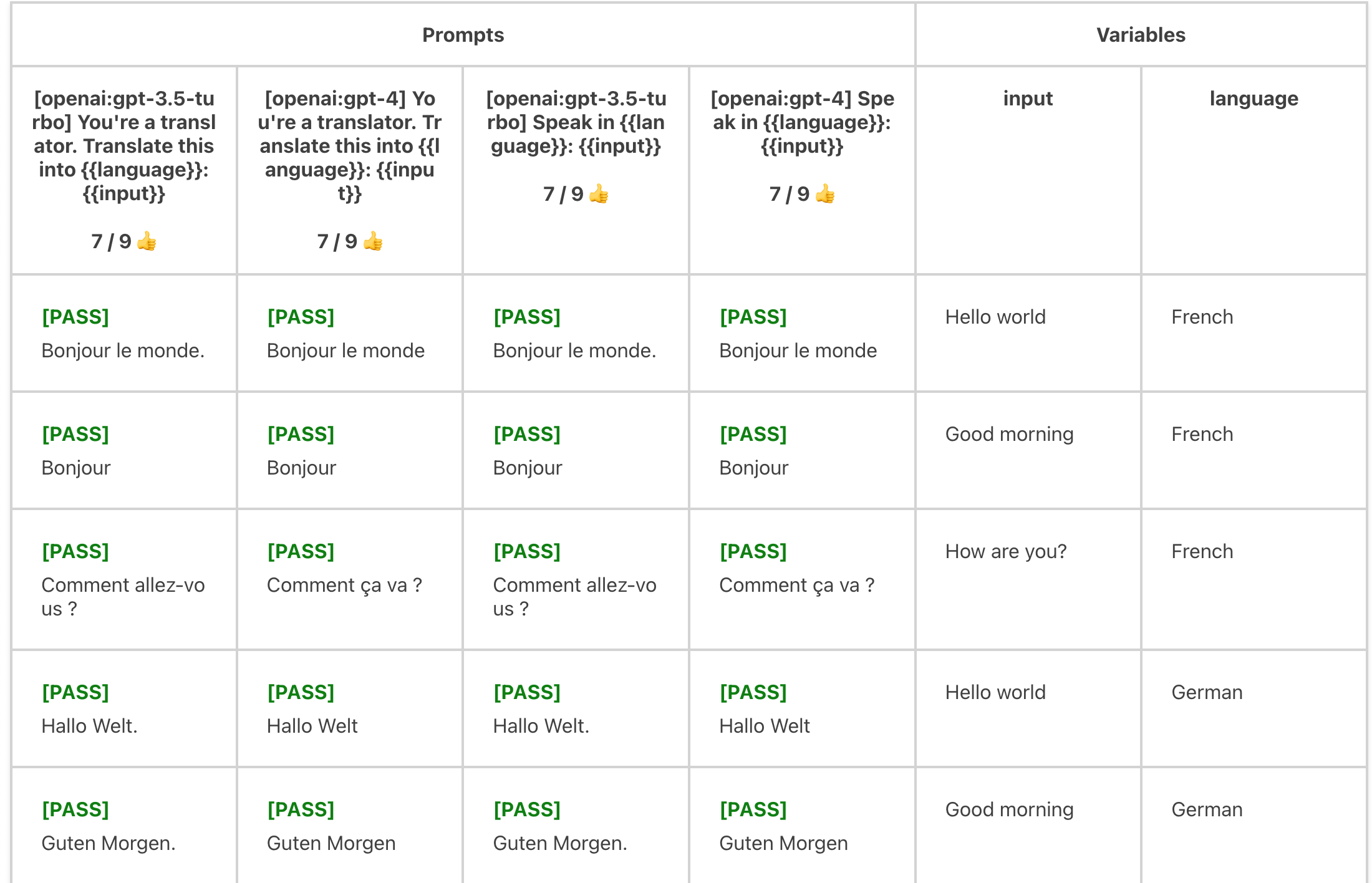 Vars can also be imported from globbed filepaths. They are automatically expanded into an array. For example:
```yaml
- vars:
language:
- French
- German
- Spanish
// highlight-start
input: file://path/to/inputs/*.txt
// highlight-end
```
## Using nunjucks templates
Use Nunjucks templates to exert additional control over your prompt templates, including loops, conditionals, and more.
### Manipulating objects
In the above examples, `vars` values are strings. But `vars` can be any JSON or YAML entity, including nested objects. You can manipulate these objects in the prompt, which are [nunjucks](https://mozilla.github.io/nunjucks/) templates:
promptfooconfig.yaml:
```yaml
tests:
- vars:
user_profile:
name: John Doe
interests:
- reading
- gaming
- hiking
recent_activity:
type: reading
details:
title: 'The Great Gatsby'
author: 'F. Scott Fitzgerald'
```
prompt.txt:
```liquid
User Profile:
- Name: {{ user_profile.name }}
- Interests: {{ user_profile.interests | join(', ') }}
- Recent Activity: {{ recent_activity.type }} on "{{ recent_activity.details.title }}" by {{ recent_activity.details.author }}
Based on the above user profile, generate a personalized reading recommendation list that includes books similar to "{{ recent_activity.details.title }}" and aligns with the user's interests.
```
Here's another example. Consider this test case, which lists a handful of user and assistant messages in an OpenAI-compatible format:
```yaml
tests:
- vars:
previous_messages:
- role: user
content: hello world
- role: assistant
content: how are you?
- role: user
content: great, thanks
```
The corresponding `prompt.txt` file simply passes through the `previous_messages` object using the [dump](https://mozilla.github.io/nunjucks/templating.html#dump) filter to convert the object to a JSON string:
```nunjucks
{{ previous_messages | dump }}
```
Running `promptfoo eval -p prompt.txt -c path_to.yaml` will call the Chat Completion API with the following prompt:
```json
[
{
"role": "user",
"content": "hello world"
},
{
"role": "assistant",
"content": "how are you?"
},
{
"role": "user",
"content": "great, thanks"
}
]
```
### Escaping JSON strings
If the prompt is valid JSON, nunjucks variables are automatically escaped when they are included in strings:
```yaml
tests:
- vars:
system_message: >
This multiline "system message" with quotes...
Is automatically escaped in JSON prompts!
```
```json
{
"role": "system",
"content": "{{ system_message }}"
}
```
You can also manually escape the string using the nunjucks [dump](https://mozilla.github.io/nunjucks/templating.html#dump) filter. This is necessary if your prompt is not valid JSON, for example if you are using nunjucks syntax:
```liquid
{
"role": {% if 'admin' in message %} "system" {% else %} "user" {% endif %},
"content": {{ message | dump }}
}
```
### Variable composition
Variables can reference other variables:
```yaml
prompts:
- 'Write a {{item}}'
tests:
- vars:
item: 'tweet about {{topic}}'
topic: 'bananas'
- vars:
item: 'instagram about {{topic}}'
topic: 'theoretical quantum physics in alternate dimensions'
```
### Accessing environment variables
You can access environment variables in your templates using the `env` global:
```yaml
prompts:
- 'file://{{ env.PROMPT_DIR }}/prompt.txt'
tests:
- vars:
headline: 'Articles about {{ env.TOPIC }}'
```
Environment variables are resolved at config load time (not runtime) and can control file paths and API keys—only use them in trusted environments.
:::warning
Avoid copying secrets into `config.env` with templates like `ANTHROPIC_API_KEY: '{{ env.ANTHROPIC_API_KEY }}'`. This resolves the secret into the eval config object and may appear in exported results.
If a secret is already present in your shell environment (or loaded via `--env-file`), prefer reading it directly from process env and keep `config.env` for non-sensitive flags.
:::
## Tools and Functions
promptfoo supports tool use and function calling with Google, OpenAI and Anthropic models, as well as other provider-specific configurations like temperature and number of tokens. For more information on defining functions and tools, see the [Google Vertex provider docs](/docs/providers/vertex/#function-calling-and-tools), [Google AIStudio provider docs](/docs/providers/google/#tool-calling), [Google Live provider docs](/docs/providers/google#function-calling-example), [OpenAI provider docs](/docs/providers/openai#using-tools) and the [Anthropic provider docs](/docs/providers/anthropic#tool-calling).
## Thinking Output
Some models, like Anthropic's Claude and DeepSeek, support thinking/reasoning capabilities that allow the model to show its reasoning process before providing a final answer.
This is useful for reasoning tasks or understanding how the model arrived at its conclusion.
### Controlling Thinking Output
By default, thinking content is included in the response. You can hide it by setting `showThinking` to `false`.
For example, for Claude:
```yaml
providers:
- id: anthropic:messages:claude-sonnet-4-5-20250929
config:
thinking:
type: 'enabled'
budget_tokens: 16000
showThinking: false # Exclude thinking content from output
```
This is useful when you want better reasoning but don't want to expose the thinking process to your assertions.
For more details on extended thinking capabilities, see the [Anthropic provider docs](/docs/providers/anthropic#extended-thinking) and [AWS Bedrock provider docs](/docs/providers/aws-bedrock#claude-models).
## Transforming outputs
Transforms can be applied at multiple levels in the evaluation pipeline:
### Transform execution order
1. **Provider transforms** (`transformResponse`) - Always applied first
2. **Test transforms** (`options.transform`) and **Context transforms** (`contextTransform`)
- Both receive the output from the provider transform
- Test transforms modify the output for assertions
- Context transforms extract context for context-based assertions (e.g., `context-faithfulness`)
### Test transform hierarchy
For test transforms specifically:
1. Default test transforms (if specified in `defaultTest`)
2. Individual test case transforms (overrides `defaultTest` transform if present)
Note that only one transform is applied at the test case level - either from `defaultTest` or the individual test case, not both.
The `TestCase.options.transform` field is a Javascript snippet that modifies the LLM output before it is run through the test assertions.
It is a function that takes a string output and a context object:
```typescript
transformFn: (output: string, context: {
prompt: {
// ID of the prompt, if assigned
id?: string;
// Raw prompt as provided in the test case, without {{variable}} substitution.
raw?: string;
// Prompt as sent to the LLM API and assertions.
display?: string;
};
vars?: Record;
// Metadata returned in the provider response.
metadata?: Record;
}) => void;
```
This is useful if you need to somehow transform or clean LLM output before running an eval.
For example:
```yaml
# ...
tests:
- vars:
language: French
body: Hello world
options:
// highlight-start
transform: output.toUpperCase()
// highlight-end
# ...
```
Or multiline:
```yaml
# ...
tests:
- vars:
language: French
body: Hello world
options:
// highlight-start
transform: |
output = output.replace(context.vars.language, 'foo');
const words = output.split(' ').filter(x => !!x);
return JSON.stringify(words);
// highlight-end
# ...
```
It also works in assertions, which is useful for picking values out of JSON:
```yaml
tests:
- vars:
# ...
assert:
- type: equals
value: 'foo'
transform: output.category # Select the 'category' key from output json
```
:::tip
Use `defaultTest` apply a transform option to every test case in your test suite.
:::
:::tip
When using the [Node.js package](/docs/usage/node-package#transform-functions), you can pass functions directly as `transform`, `transformVars`, and `contextTransform` values instead of string expressions.
:::
### Transforms from separate files
Transform functions can be executed from external JavaScript or Python files. You can optionally specify a function name to use.
For JavaScript:
```yaml
defaultTest:
options:
transform: file://transform.js:customTransform
```
```js title="transform.js"
module.exports = {
customTransform: (output, context) => {
// context.vars, context.prompt
return output.toUpperCase();
},
};
```
For Python:
```yaml
defaultTest:
options:
transform: file://transform.py
```
```python title="transform.py"
def get_transform(output, context):
# context['vars'], context['prompt']
return output.upper()
```
If no function name is specified for Python files, it defaults to `get_transform`. To use a custom Python function, specify it in the file path:
```yaml
transform: file://transform.py:custom_python_transform
```
## Transforming input variables
You can also transform input variables before they are used in prompts using the `transformVars` option. This feature is useful when you need to pre-process data or load content from external sources.
The `transformVars` function should return an object with the transformed variable names and values. These transformed variables are added to the `vars` object and can override existing keys. For example:
```yaml
prompts:
- 'Summarize the following text in {{topic_length}} words: {{processed_content}}'
defaultTest:
options:
transformVars: |
return {
uppercase_topic: vars.topic.toUpperCase(),
topic_length: vars.topic.length,
processed_content: vars.content.trim()
};
tests:
- vars:
topic: 'climate change'
content: ' This is some text about climate change that needs processing. '
assert:
- type: contains
value: '{{uppercase_topic}}'
```
Transform functions can also be specified within individual test cases.
```yaml
tests:
- vars:
url: 'https://example.com/image.png'
options:
transformVars: |
return { ...vars, image_markdown: `` }
```
### Input transforms from separate files
For more complex transformations, you can use external files for `transformVars`:
```yaml
defaultTest:
options:
transformVars: file://transformVars.js:customTransformVars
```
```js title="transformVars.js"
const fs = require('fs');
module.exports = {
customTransformVars: (vars, context) => {
try {
return {
uppercase_topic: vars.topic.toUpperCase(),
topic_length: vars.topic.length,
file_content: fs.readFileSync(vars.file_path, 'utf-8'),
};
} catch (error) {
console.error('Error in transformVars:', error);
return {
error: 'Failed to transform variables',
};
}
},
};
```
You can also define transforms in python.
```yaml
defaultTest:
options:
transformVars: file://transform_vars.py
```
```python title="transform_vars.py"
import os
def get_transform(vars, context):
with open(vars['file_path'], 'r') as file:
file_content = file.read()
return {
'uppercase_topic': vars['topic'].upper(),
'topic_length': len(vars['topic']),
'file_content': file_content,
'word_count': len(file_content.split())
}
```
## Config structure and organization
For detailed information on the config structure, see [Configuration Reference](/docs/configuration/reference).
If you have multiple sets of tests, it helps to split them into multiple config files. Use the `--config` or `-c` parameter to run each individual config:
```
promptfoo eval -c usecase1.yaml
```
and
```
promptfoo eval -c usecase2.yaml
```
You can run multiple configs at the same time, which will combine them into a single eval. For example:
```
promptfoo eval -c my_configs/*
```
or
```
promptfoo eval -c config1.yaml -c config2.yaml -c config3.yaml
```
## Loading tests from CSV
YAML is nice, but some organizations maintain their LLM tests in spreadsheets for ease of collaboration. promptfoo supports a special [CSV file format](/docs/configuration/test-cases#csv-format).
```yaml
prompts:
- file://prompt1.txt
- file://prompt2.txt
providers:
- openai:gpt-5-mini
- vertex:gemini-2.0-flash-exp
// highlight-next-line
tests: file://tests.csv
```
promptfoo also has built-in ability to pull test cases from a Google Sheet. The easiest way to get started is to set the sheet visible to "anyone with the link". For example:
```yaml
prompts:
- file://prompt1.txt
- file://prompt2.txt
providers:
- openai:gpt-5-mini
- vertex:gemini-2.0-flash-exp
// highlight-next-line
tests: https://docs.google.com/spreadsheets/d/1eqFnv1vzkPvS7zG-mYsqNDwOzvSaiIAsKB3zKg9H18c/edit?usp=sharing
```
Here's a [full example](https://github.com/promptfoo/promptfoo/tree/main/examples/integration-google-sheets).
See [Google Sheets integration](/docs/integrations/google-sheets) for details on how to set up promptfoo to access a private spreadsheet.
Vars can also be imported from globbed filepaths. They are automatically expanded into an array. For example:
```yaml
- vars:
language:
- French
- German
- Spanish
// highlight-start
input: file://path/to/inputs/*.txt
// highlight-end
```
## Using nunjucks templates
Use Nunjucks templates to exert additional control over your prompt templates, including loops, conditionals, and more.
### Manipulating objects
In the above examples, `vars` values are strings. But `vars` can be any JSON or YAML entity, including nested objects. You can manipulate these objects in the prompt, which are [nunjucks](https://mozilla.github.io/nunjucks/) templates:
promptfooconfig.yaml:
```yaml
tests:
- vars:
user_profile:
name: John Doe
interests:
- reading
- gaming
- hiking
recent_activity:
type: reading
details:
title: 'The Great Gatsby'
author: 'F. Scott Fitzgerald'
```
prompt.txt:
```liquid
User Profile:
- Name: {{ user_profile.name }}
- Interests: {{ user_profile.interests | join(', ') }}
- Recent Activity: {{ recent_activity.type }} on "{{ recent_activity.details.title }}" by {{ recent_activity.details.author }}
Based on the above user profile, generate a personalized reading recommendation list that includes books similar to "{{ recent_activity.details.title }}" and aligns with the user's interests.
```
Here's another example. Consider this test case, which lists a handful of user and assistant messages in an OpenAI-compatible format:
```yaml
tests:
- vars:
previous_messages:
- role: user
content: hello world
- role: assistant
content: how are you?
- role: user
content: great, thanks
```
The corresponding `prompt.txt` file simply passes through the `previous_messages` object using the [dump](https://mozilla.github.io/nunjucks/templating.html#dump) filter to convert the object to a JSON string:
```nunjucks
{{ previous_messages | dump }}
```
Running `promptfoo eval -p prompt.txt -c path_to.yaml` will call the Chat Completion API with the following prompt:
```json
[
{
"role": "user",
"content": "hello world"
},
{
"role": "assistant",
"content": "how are you?"
},
{
"role": "user",
"content": "great, thanks"
}
]
```
### Escaping JSON strings
If the prompt is valid JSON, nunjucks variables are automatically escaped when they are included in strings:
```yaml
tests:
- vars:
system_message: >
This multiline "system message" with quotes...
Is automatically escaped in JSON prompts!
```
```json
{
"role": "system",
"content": "{{ system_message }}"
}
```
You can also manually escape the string using the nunjucks [dump](https://mozilla.github.io/nunjucks/templating.html#dump) filter. This is necessary if your prompt is not valid JSON, for example if you are using nunjucks syntax:
```liquid
{
"role": {% if 'admin' in message %} "system" {% else %} "user" {% endif %},
"content": {{ message | dump }}
}
```
### Variable composition
Variables can reference other variables:
```yaml
prompts:
- 'Write a {{item}}'
tests:
- vars:
item: 'tweet about {{topic}}'
topic: 'bananas'
- vars:
item: 'instagram about {{topic}}'
topic: 'theoretical quantum physics in alternate dimensions'
```
### Accessing environment variables
You can access environment variables in your templates using the `env` global:
```yaml
prompts:
- 'file://{{ env.PROMPT_DIR }}/prompt.txt'
tests:
- vars:
headline: 'Articles about {{ env.TOPIC }}'
```
Environment variables are resolved at config load time (not runtime) and can control file paths and API keys—only use them in trusted environments.
:::warning
Avoid copying secrets into `config.env` with templates like `ANTHROPIC_API_KEY: '{{ env.ANTHROPIC_API_KEY }}'`. This resolves the secret into the eval config object and may appear in exported results.
If a secret is already present in your shell environment (or loaded via `--env-file`), prefer reading it directly from process env and keep `config.env` for non-sensitive flags.
:::
## Tools and Functions
promptfoo supports tool use and function calling with Google, OpenAI and Anthropic models, as well as other provider-specific configurations like temperature and number of tokens. For more information on defining functions and tools, see the [Google Vertex provider docs](/docs/providers/vertex/#function-calling-and-tools), [Google AIStudio provider docs](/docs/providers/google/#tool-calling), [Google Live provider docs](/docs/providers/google#function-calling-example), [OpenAI provider docs](/docs/providers/openai#using-tools) and the [Anthropic provider docs](/docs/providers/anthropic#tool-calling).
## Thinking Output
Some models, like Anthropic's Claude and DeepSeek, support thinking/reasoning capabilities that allow the model to show its reasoning process before providing a final answer.
This is useful for reasoning tasks or understanding how the model arrived at its conclusion.
### Controlling Thinking Output
By default, thinking content is included in the response. You can hide it by setting `showThinking` to `false`.
For example, for Claude:
```yaml
providers:
- id: anthropic:messages:claude-sonnet-4-5-20250929
config:
thinking:
type: 'enabled'
budget_tokens: 16000
showThinking: false # Exclude thinking content from output
```
This is useful when you want better reasoning but don't want to expose the thinking process to your assertions.
For more details on extended thinking capabilities, see the [Anthropic provider docs](/docs/providers/anthropic#extended-thinking) and [AWS Bedrock provider docs](/docs/providers/aws-bedrock#claude-models).
## Transforming outputs
Transforms can be applied at multiple levels in the evaluation pipeline:
### Transform execution order
1. **Provider transforms** (`transformResponse`) - Always applied first
2. **Test transforms** (`options.transform`) and **Context transforms** (`contextTransform`)
- Both receive the output from the provider transform
- Test transforms modify the output for assertions
- Context transforms extract context for context-based assertions (e.g., `context-faithfulness`)
### Test transform hierarchy
For test transforms specifically:
1. Default test transforms (if specified in `defaultTest`)
2. Individual test case transforms (overrides `defaultTest` transform if present)
Note that only one transform is applied at the test case level - either from `defaultTest` or the individual test case, not both.
The `TestCase.options.transform` field is a Javascript snippet that modifies the LLM output before it is run through the test assertions.
It is a function that takes a string output and a context object:
```typescript
transformFn: (output: string, context: {
prompt: {
// ID of the prompt, if assigned
id?: string;
// Raw prompt as provided in the test case, without {{variable}} substitution.
raw?: string;
// Prompt as sent to the LLM API and assertions.
display?: string;
};
vars?: Record;
// Metadata returned in the provider response.
metadata?: Record;
}) => void;
```
This is useful if you need to somehow transform or clean LLM output before running an eval.
For example:
```yaml
# ...
tests:
- vars:
language: French
body: Hello world
options:
// highlight-start
transform: output.toUpperCase()
// highlight-end
# ...
```
Or multiline:
```yaml
# ...
tests:
- vars:
language: French
body: Hello world
options:
// highlight-start
transform: |
output = output.replace(context.vars.language, 'foo');
const words = output.split(' ').filter(x => !!x);
return JSON.stringify(words);
// highlight-end
# ...
```
It also works in assertions, which is useful for picking values out of JSON:
```yaml
tests:
- vars:
# ...
assert:
- type: equals
value: 'foo'
transform: output.category # Select the 'category' key from output json
```
:::tip
Use `defaultTest` apply a transform option to every test case in your test suite.
:::
:::tip
When using the [Node.js package](/docs/usage/node-package#transform-functions), you can pass functions directly as `transform`, `transformVars`, and `contextTransform` values instead of string expressions.
:::
### Transforms from separate files
Transform functions can be executed from external JavaScript or Python files. You can optionally specify a function name to use.
For JavaScript:
```yaml
defaultTest:
options:
transform: file://transform.js:customTransform
```
```js title="transform.js"
module.exports = {
customTransform: (output, context) => {
// context.vars, context.prompt
return output.toUpperCase();
},
};
```
For Python:
```yaml
defaultTest:
options:
transform: file://transform.py
```
```python title="transform.py"
def get_transform(output, context):
# context['vars'], context['prompt']
return output.upper()
```
If no function name is specified for Python files, it defaults to `get_transform`. To use a custom Python function, specify it in the file path:
```yaml
transform: file://transform.py:custom_python_transform
```
## Transforming input variables
You can also transform input variables before they are used in prompts using the `transformVars` option. This feature is useful when you need to pre-process data or load content from external sources.
The `transformVars` function should return an object with the transformed variable names and values. These transformed variables are added to the `vars` object and can override existing keys. For example:
```yaml
prompts:
- 'Summarize the following text in {{topic_length}} words: {{processed_content}}'
defaultTest:
options:
transformVars: |
return {
uppercase_topic: vars.topic.toUpperCase(),
topic_length: vars.topic.length,
processed_content: vars.content.trim()
};
tests:
- vars:
topic: 'climate change'
content: ' This is some text about climate change that needs processing. '
assert:
- type: contains
value: '{{uppercase_topic}}'
```
Transform functions can also be specified within individual test cases.
```yaml
tests:
- vars:
url: 'https://example.com/image.png'
options:
transformVars: |
return { ...vars, image_markdown: `` }
```
### Input transforms from separate files
For more complex transformations, you can use external files for `transformVars`:
```yaml
defaultTest:
options:
transformVars: file://transformVars.js:customTransformVars
```
```js title="transformVars.js"
const fs = require('fs');
module.exports = {
customTransformVars: (vars, context) => {
try {
return {
uppercase_topic: vars.topic.toUpperCase(),
topic_length: vars.topic.length,
file_content: fs.readFileSync(vars.file_path, 'utf-8'),
};
} catch (error) {
console.error('Error in transformVars:', error);
return {
error: 'Failed to transform variables',
};
}
},
};
```
You can also define transforms in python.
```yaml
defaultTest:
options:
transformVars: file://transform_vars.py
```
```python title="transform_vars.py"
import os
def get_transform(vars, context):
with open(vars['file_path'], 'r') as file:
file_content = file.read()
return {
'uppercase_topic': vars['topic'].upper(),
'topic_length': len(vars['topic']),
'file_content': file_content,
'word_count': len(file_content.split())
}
```
## Config structure and organization
For detailed information on the config structure, see [Configuration Reference](/docs/configuration/reference).
If you have multiple sets of tests, it helps to split them into multiple config files. Use the `--config` or `-c` parameter to run each individual config:
```
promptfoo eval -c usecase1.yaml
```
and
```
promptfoo eval -c usecase2.yaml
```
You can run multiple configs at the same time, which will combine them into a single eval. For example:
```
promptfoo eval -c my_configs/*
```
or
```
promptfoo eval -c config1.yaml -c config2.yaml -c config3.yaml
```
## Loading tests from CSV
YAML is nice, but some organizations maintain their LLM tests in spreadsheets for ease of collaboration. promptfoo supports a special [CSV file format](/docs/configuration/test-cases#csv-format).
```yaml
prompts:
- file://prompt1.txt
- file://prompt2.txt
providers:
- openai:gpt-5-mini
- vertex:gemini-2.0-flash-exp
// highlight-next-line
tests: file://tests.csv
```
promptfoo also has built-in ability to pull test cases from a Google Sheet. The easiest way to get started is to set the sheet visible to "anyone with the link". For example:
```yaml
prompts:
- file://prompt1.txt
- file://prompt2.txt
providers:
- openai:gpt-5-mini
- vertex:gemini-2.0-flash-exp
// highlight-next-line
tests: https://docs.google.com/spreadsheets/d/1eqFnv1vzkPvS7zG-mYsqNDwOzvSaiIAsKB3zKg9H18c/edit?usp=sharing
```
Here's a [full example](https://github.com/promptfoo/promptfoo/tree/main/examples/integration-google-sheets).
See [Google Sheets integration](/docs/integrations/google-sheets) for details on how to set up promptfoo to access a private spreadsheet.